Creating a Control Flow Loop Module
This chapter explains how to extend the Control Flow package by creating additional loop modules. For more information on Control Flow or the Control Flow Assistant, please refer to Control Flow in VisTrails or The Control Flow Assistant in the User’s Guide.
Building your own loop structure
In functional programming, fold is a high-order function used to
encapsulate a pattern of recursion for processing lists. A simple example of a
fold is summing the elements inside a list. If you fold the
list [1, 2, 3, 4] with the sum operator, the result will be (((1+2)+3)+4) = 10. It’s
common to start with an initial value too. In the sum example, the initial value
would be 0, and the result would be ((((0+1)+2)+3)+4) = 10.
With this function, a programmer can do any type of recursion. In fact, the
map and filter functions, shown previously, can be implemented
with fold. The Control Flow package provides a Fold
module to enable this functionality, and the Map and the Filter
modules inherit from the Fold class.
In fact, any control module that has this kind of recursion uses the Fold
class. To use this functionality for your own control modules, instead of defining
the compute() method, you need to define two other methods:
setInitialValue(): in this method, you will set the initial value of the fold operator through theself.initialValueattribute;operation(): in this method, you must implement the function to be applied recursively to the elements of the input list (e.g., the sum function). More specifically, you need to define the relationship between the previous iteration’s result (self.partialResultattribute) and the current element of the list (self.elementattribute); this method must be defined after thesetInitialValue()one.
It’s important to notice that all modules inheriting from Fold will have
the same ports, as Map and Filter, but you can add any other
ports that will be necessary for your control structure. Also, you do not need to use
the input ports “FunctionPort”, “InputPort” and
“OutputPort”. You will only use them when you create an operator like
Map and Filter, which need a function to be applied for each
element of the input list.
As an example, we will create a simple Sum module to better understand the
idea. Create a new package, and the code inside it would be as follows:
1 2 3 4 5 6 7 8 9 10 11 12 13 14 15 16 17 18 | from controlflow import Fold, registerControl
version = "0.1"
name = "My Control Modules"
identifier = "org.vistrails.my_control_modules"
def package_dependencies():
return ["org.vistrails.vistrails.control_flow"]
class Sum(Fold):
def setInitialValue(self):
self.initialValue = 0
def operation(self):
self.partialResult += self.element
def initialize(*args,**keywords):
registerControl(Sum)
|
We begin by importing the Fold class and the registerControl
function from the Control Flow package (Line 1).
The registerControl function is used to register the control modules, so
the shape of them can be set automatically.
Also, define the variables version, name and
identifier, as it’s done for all
packages. The interpackage dependency (include reference of the package chapter) is
used too, as My Control Modules requires a module and a function from
Control Flow (Lines 7 and 8); in
this way, VisTrails can initialize the packages in the correct order. Then, create
the class Sum, which inherits from Fold. Inside it, set the
initial value to 0 inside the setInitialValue() method
(Lines 11 and 12), and define the sum operator
inside operation(), as shown clearly by the relation between
self.partialResult and self.element
(Lines 14 and 15).
The last thing we must do is define the initialize() method, so the
package can be loaded in VisTrails. However, instead of calling the registry, if you
do not need any other ports, you just have to call the registerControl()
function (Line 18).
Save this package and enable it inside VisTrails. Create a similar workflow as shown in Figure A workflow using the Sum module.
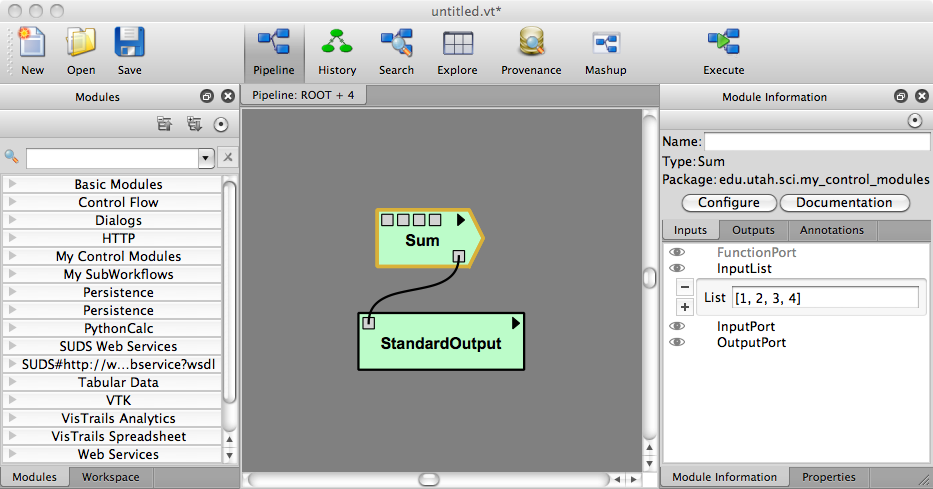
A workflow using the Sum module
Upon executing this workflow, the sum ((((0+1)+2)+3)+4), should be printed on your terminal as follows:
10
Note that the input ports “FunctionPort”, “InputPort” and
“OutputPort” were not necessary for this module. Now, let’s see another
example that does use them. Open the workflow we used to calculate the area of
isosurfaces (in “triangle_area.vt”, “Surface Area with Map
and Filter” version), and delete the Map, the Filter, and the
FilterCondition (PythonSource) modules.
Now, create a single module that maps the list and filters the results, named as
AreaFilter. Inside your package, add the following class:
1 2 3 4 5 6 7 8 9 | class AreaFilter(Fold):
def setInitialValue(self):
self.initialValue = []
def operation(self):
area = self.elementResult
if area>200000:
self.partialResult.append(area)
|
The initial value is an empty list, so the result of each element can be appended to
it (Line 3). In the operation() method, the
self.elementResult attribute is used (Line 6);
it represents the result of the port chosen in “OutputPort”; so, it means
that “FunctionPort”, “InputPort” and “OutputPort” will have
connections. In this workflow, self.elementResult is the area for each
contour value inside the input list, and, if the area is above 200,000, it will be
appended to the final result (Lines 8 and 9). We can easily see that this module does exactly
the same as Map and Filter combined.
Don’t forget to register this module in the initialize() function. After
doing this, save the package and load it again inside VisTrails. Then, just connect
AreaFilter as in Figure The same workflow, but now with AreaFilter.
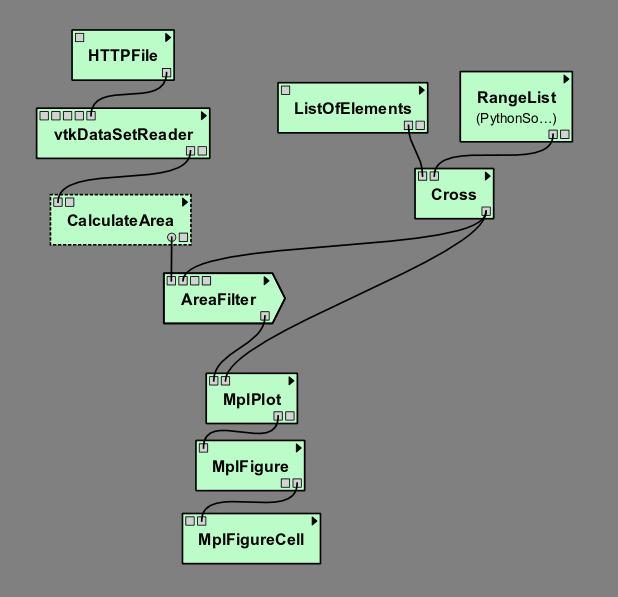
The same workflow, but now with AreaFilter
Now, you must set some values in the following parameters of AreaFilter:
- “InputPort”: [“SetValue”]
- “OutputPort”: GetSurfaceArea
When you execute this workflow, the result in the VisTrails Spreadsheet will be the
same as shown previously (Figure The result in the VisTrails spreadsheet). It
shows the flexibility of doing a recursion function by inheriting from
Fold.